
Introducing HTMX: The JS Library Streamlining Front-End Development

I know what you’re thinking: “wow, yet another article on yet another JavaScript framework.” Well, if you’re thinking that, I’m here to say “not quite.” While HTMX is indeed powered by JS, it’s more useful to think about it as an updated version of HTML to address the needs of today (hence the name HTM(l) eXtension).
In this article, I’d like to introduce HTMX: its core features, pros and cons, and of course when it’s a good option for your web application. My goal is to help you decide if (or when) it might be a good idea to start a new project using HTMX, or even to make the switch from other popular JS frameworks / libraries.
Table Of Contents
What is HTMX?
HTMX is a dependency-free JavaScript library. That means there’s no need for complicated build steps – developers simply add a <script> tag into the <head> element to get started. Before we go deeper, however, we must first discuss HTML, which has always been the language of the web.
The web has changed immensely since its conception. The days of a network of documents is long gone, largely replaced by the interactive web applications that we all know and love. This shift towards interactivity requires intensive use of JavaScript and increasingly complex architectures.

What Improvements Does HTMX Offer Over HTML?
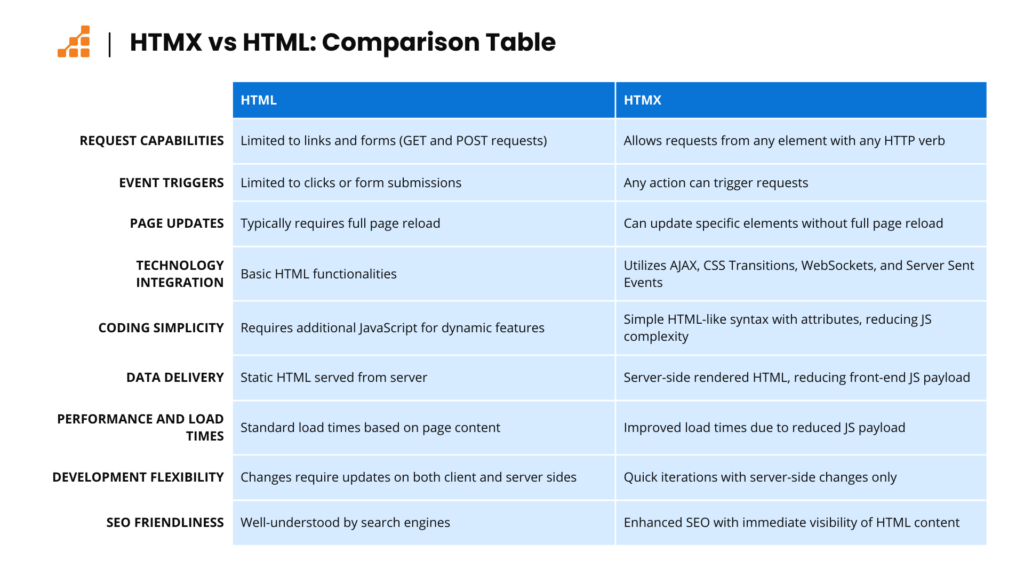
HTMX extends HTML to get around its limitations, making it better-suited for the modern web, while keeping the trademark simplicity of HTML.
Specifically, HTMX:
- Gives us the ability to make requests from any element, instead of limiting requests to links and forms.
- Any action can trigger those events, not just clicks or form submissions.
- No more being limited to GET and POST requests; with HTMX, we can trigger all the others like PUT or DELETE.
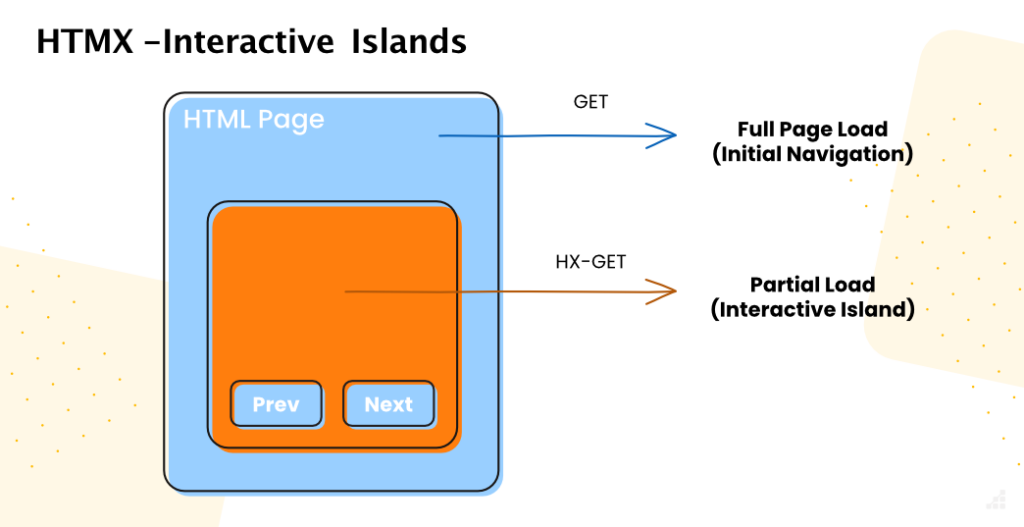
- Instead of updating the whole page, we can designate any element as the target for the update.
HTMX achieves this by giving us access to AJAX, CSS Transitions, WebSockets and Server Sent Events directly in HTML, using a superset of attributes that are powered by an incredibly lightweight and non-intrusive JavaScript framework.
HTMX front-end code looks and feels like good ol’ HTML: instead of writing complex JS functions, we just add attributes to our HTML tags.
The unique(ish) approach of HTMX to UI
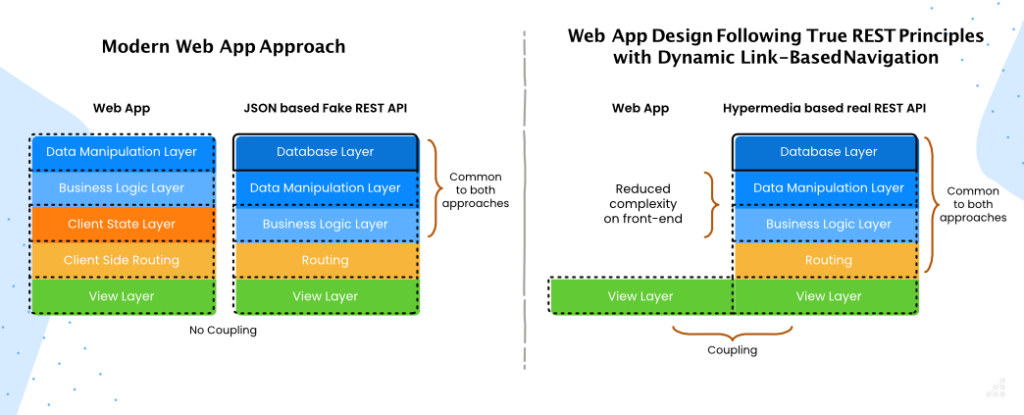
The core idea of HTMX is that it’s HTML “over-the-wire” – that is, returning the data formatted as HTML directly, rather than using JSON as an intermediary.
This offers several advantages:
- Simplified front-end logic: By sending HTML directly, the complexity of rendering logic on the client side is significantly reduced. Most of the responsibility for the view is handled directly by the back-end, which means the front-end doesn’t need to parse JSON data or deal with any complex solution to reconstruct the DOM. This leads to a much cleaner and maintainable codebase.
- Reduced JavaScript payload: there’s less JavaScript code that needs to be downloaded, parsed, and executed, which results in faster initial load times and improved performance. This is great for all users, but it’s particularly useful for those on slower connections or devices.
- Quick iterations on the UI: Since the HTML is generated and rendered on the server side, changes to the user interface or presentation logic can often be made without modifying the client-side JavaScript. This can speed up the development process, as developers can make changes in one place and see them reflected across all client environments.
- Improved SEO: Delivering fully formed HTML content can be more SEO-friendly. While search engines have become better at executing JavaScript and indexing dynamically generated content, directly delivered HTML ensures immediate visibility of content to crawlers.
Key benefits of using HTMX
Lightweight
HTMX is incredibly lightweight, as it leverages the power of existing HTML and server-side technologies, requiring only a small runtime library (14kb gzipped) to run powerful, responsive applications comparable to those built with front-end frameworks at a fraction of the size.
Smaller Codebases
One of the most significant advantages of using HTMX is its ability to produce smaller codebases. Since HTMX relies on adding attributes directly to HTML elements to define behavior, there’s no need for verbose JavaScript code to manipulate the DOM or handle events. This reduces development time and results in a more readable and maintainable codebase. In some cases, switching from React to HTMX has resulted in a codebase that’s a third of the size! Because smaller codebases are easier to debug and understand, it’s simpler for teams to collaborate and for new developers to get up to speed quickly.
Easy to Learn
HTMX is designed to be easy to learn, especially for those already familiar with HTML. Its syntax and concepts are straightforward, focusing on enhancing standard HTML behavior rather than replacing it with a complex JavaScript framework. This ease of learning means that developers can start using HTMX effectively after a short period of acclimation, integrating it into their projects without a steep learning curve. Additionally, HTMX has solid documentation and community resources that provide clear examples and guides, further reducing the barrier to entry for new users.
Cost-Effective
The low learning curve and lightweight nature make it highly cost-efficient for web development. Projects can be completed faster and with fewer resources, as there’s less code to write, test, and maintain. Because it’s easy to learn, teams leveraging HTMX can be more flexible – developers can contribute to front-end development without needing deep expertise in complex JS frameworks. This versatility can lead to more efficient use of development resources and lower overall project costs. Finally, the reduced need for heavy client-side frameworks also means that applications can run on a broader range of devices, potentially lowering server costs due to decreased bandwidth and processing requirements.
How HTMX works
Send Requests from Any HTML Element
HTMX enables sending asynchronous HTTP requests (such as GET, POST, DELETE, PUT) directly from HTML elements by simply adding a special attribute like hx-get, hx-post, hx-delete, or hx-put. This attribute specifies the URL to which the request is sent. This feature allows almost any element on the page to become a source of dynamic data fetch or submission, streamlining the process of making parts of your web page interactive.
Asynchronously Replace Elements with the Response
Upon receiving a response from an HTTP request, HTMX can replace or update the content of the current page without requiring a full page reload. This is achieved by targeting specific elements in the DOM for updates, making it possible to refresh only parts of the page that have changed. This selective updating reduces bandwidth usage and improves the user experience by making applications feel faster and more responsive.
Modifiers (delay, throttle, etc.)
HTMX provides a set of modifiers that can be used to control the behavior of requests and updates. For example, the hx-trigger attribute can be used with modifiers like delay and throttle to fine-tune when and how often requests are made. This allows for optimizations such as debouncing user input in search fields or rate-limiting requests to avoid overwhelming the server.
Keeps Track of Loading State
HTMX can automatically manage the loading state of asynchronous requests, providing feedback to the user that an action is in progress. By using attributes like hx-indicator, developers can designate elements that should be shown or hidden during the loading state, such as spinners or progress bars. This feature enhances the user experience by making the application feel more dynamic and responsive.
CSS Transitions
Integration with CSS transitions allows for smooth visual effects when elements are updated on the page. HTMX supports this by ensuring that updates triggered by AJAX calls can be seamlessly integrated with CSS animations, making it possible to create engaging and professional-looking dynamic user interfaces without complex JavaScript.
Form Validation
HTMX can work in tandem with HTML5 form validation, enabling developers to leverage native browser validation mechanisms. This integration simplifies the process of validating user input, ensuring that data submitted through forms meets certain criteria before being processed. HTMX enhances this by allowing asynchronous submission of forms and updating only parts of the form with validation messages, improving the feedback loop for the user.
Some HTMX Limitations to Bear in Mind
HTMX has many benefits, to be sure. But, as with any tool you choose, there are some tradeoffs. I’ve summarized the main ones below.
Can be Harder to Find Skilled Developers for Newer Frameworks
To address the elephant in the room, HTMX is nowhere near as popular as industry-standard frameworks like React. That means it’s less likely you’ll find developers that already know HTMX deeply and can hit the ground running when onboarding into your project.
That said, its foundation on web core technologies provides a smooth learning curve and makes it incredibly easy to pick up. Any experienced developer can have a clear idea of what a block of code is doing from the very first time they bump into HTMX, and should be able to learn it in just a couple of days.
Not Compatible With Mobile Apps
Another limitation is that, while sending HTML over-the-wire can look like a great idea for web applications, it goes against compatibility with other platforms. If you want to use the same API for your mobile and web apps or consume your API in any other way, parsing it may become much more difficult or even impossible. There are workarounds for this, but it can introduce needless complexity to your project.
No Type Safety
Last but not least, there’s no type safety in HTMX. I can picture the look of absolute fear in any front-end developer reading this, as TypeScript has become a standard throughout front-end development for a good reason, but in practice it’s not such a huge deal, as most of the logic is handled in the back-end.
Pairing HTMX with Alpine.js to Bridge the Gaps
While HTMX excels at server-driven development, it can struggle when applications require richer interactivity or client-side state management. That’s where Alpine.js comes in. By combining the two, developers can address some of the limitations of HTMX without introducing the complexity of a full-fledged JavaScript framework.
Alpine.js adds reactive state management, two-way binding, and conditional rendering—making it a great complement to HTMX’s server-driven simplicity. For example, HTMX can handle server-side logic and page updates, while Alpine.js manages dynamic form inputs, toggling UI elements, or animating components. Together, they provide a pragmatic solution that balances simplicity and interactivity, allowing developers to build lightweight but dynamic web applications.
Final Thoughts When Considering HTMX for Your Project
HTMX’s simplicity, performance and ease of use makes it a great choice for projects where quick deployment lightweight scripts and page-load performance are prioritized. However, it may not be the correct choice for applications that require extensive client-side logic and state management, where traditional JavaScript frameworks might still hold the edge.
Similar to any time you’re choosing between frameworks, there are always trade-offs to consider, and HTMX is no exception. Your decision to switch to HTMX, or use it in a new project, should be based on your unique project requirements, team expertise, and the desired balance between ease of development and the depth of interactive features.