
Unlocking the Power of Vector Databases: A Comprehensive Guide (Real-World Examples)

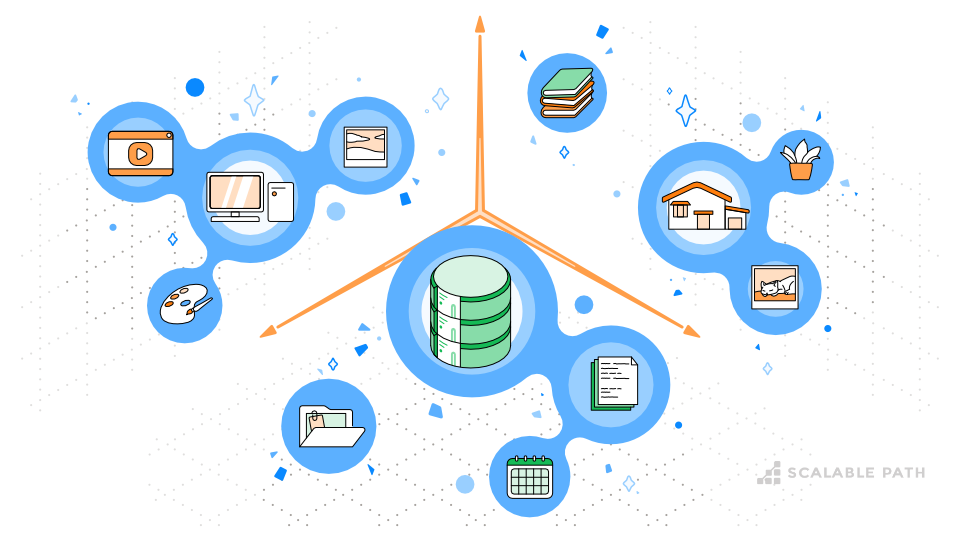
We live in a world overflowing with data. So much of our world exists in the digital space – social media interactions, sensor readings, financial transactions, scientific observations – and all of it generates data. it’s estimated that nearly half a million terabytes of data are created each day, and that number is growing exponentially.
This flood of information presents both opportunities and challenges. Businesses and organizations now have access to a treasure trove of information that can unlock insights, enhance decision-making, and spark innovation. But to tap into this goldmine, we need some serious tools and techniques.
Table Of Contents
- Traditional vs Vector Databases: Approaches to Data Processing
- What are Vector Databases?
- Core Capabilities of Vector Databases: Storage, Retrieval, and Search
- Understanding Vector Databases: Core Concepts
- Use Cases of Vector Databases: Real-World Applications
- How to Choose the Right Vector Database: Comparing Pinecone, Milvus and Faiss
- The Future of Data Management: Why Vector Databases Will Take Center Stage
- Emerging Trends and Advancements in Vector Databases
- Final Thoughts
- Querying a Vector Database: An Example
Traditional vs Vector Databases: Approaches to Data Processing
In the evolving landscape of data management, traditional and vector databases offer distinct approaches to storing and retrieving information. The choice between them depends on the nature of the data you are managing and the specific needs of your application. Understanding the characteristics of your data will help determine which database approach is most appropriate for your needs.
Traditional Databases: Great for Structured Data, Not So Great for Complex Data
Traditional relational databases have been our go-to for data management for ages. They’re perfect for storing and retrieving structured data organized in neat rows and columns, like a super-organized spreadsheet with tables for customers, products, or financial records. They shine when it comes to handling queries based on exact matches and predefined relationships between data points.

But here’s the thing: these databases aren’t so great when it comes to the messy, unstructured data we see more and more of today.
For example:
- Images and Videos: Full of pixels, color values, and other visual features that don’t fit neatly into those tidy tables.
- User Behavior Data: Clickstreams, preferences, and interaction logs that hold valuable insights but need a different approach to analyze.
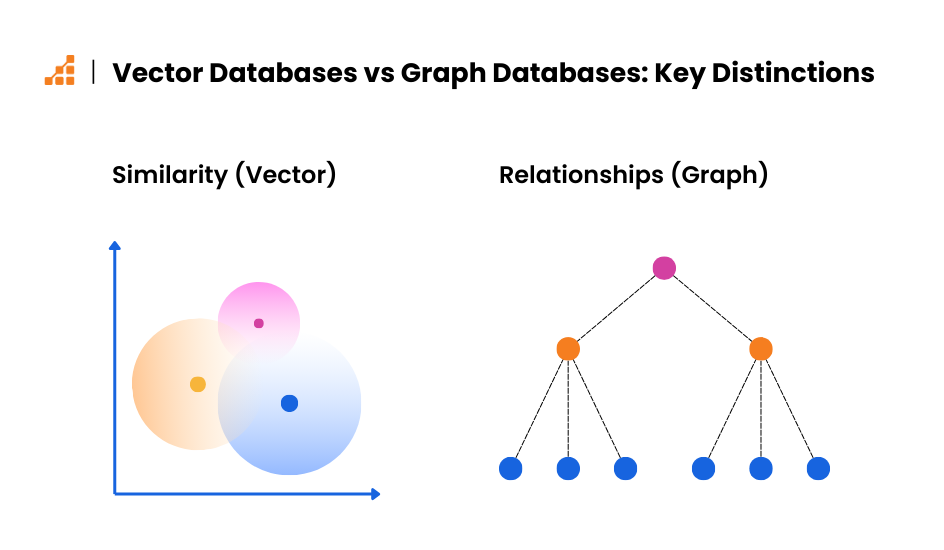
Enter Vector Databases: A New Way for Efficient Data Processing
Vector databases emerge as a revolutionary solution for managing and analyzing this complex, high-dimensional data. They offer a new paradigm for data storage and retrieval, specifically designed to handle data points represented as vectors in a multidimensional space.

What are Vector Databases?
First, let’s take some time to understand what vector databases are.
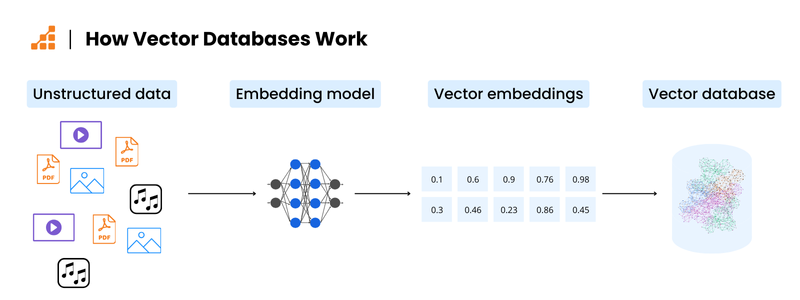
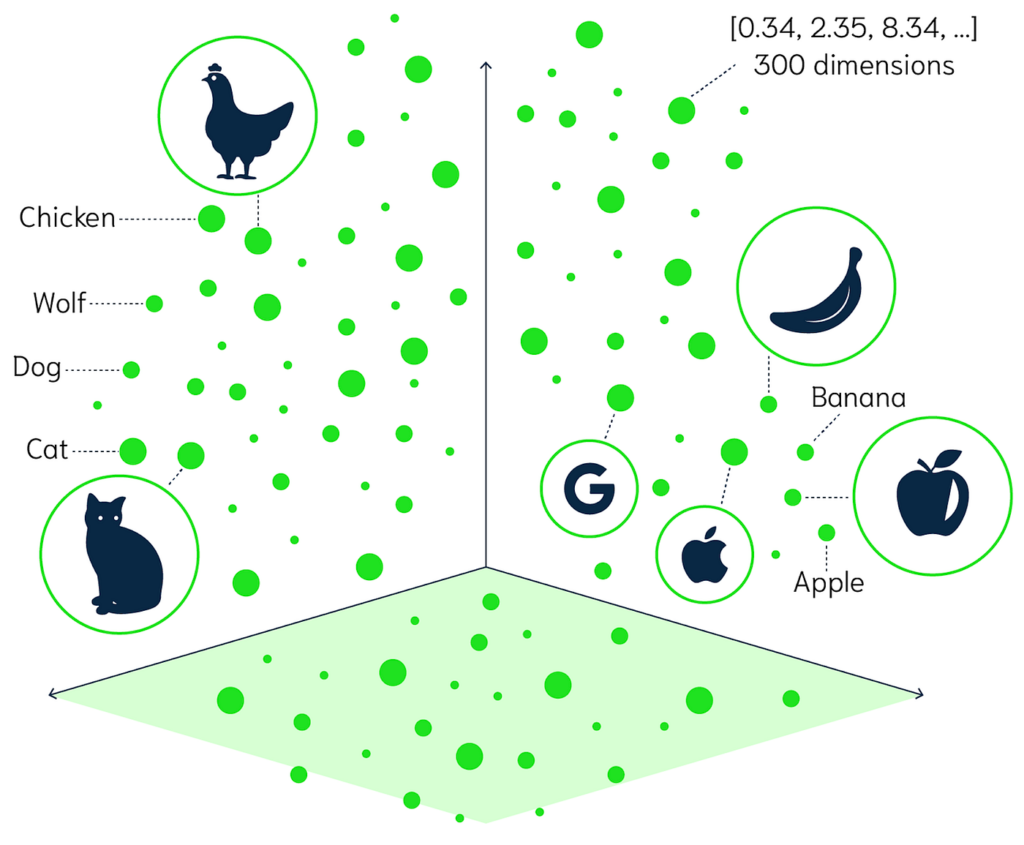
Simply put, vector databases store and manage data points as vectors—numerical representations in a high-dimensional space. Each dimension corresponds to a specific feature of the data. For example, an image might be represented by a vector with dimensions for color, brightness, texture, and other visual characteristics.
Core Capabilities of Vector Databases: Storage, Retrieval, and Search
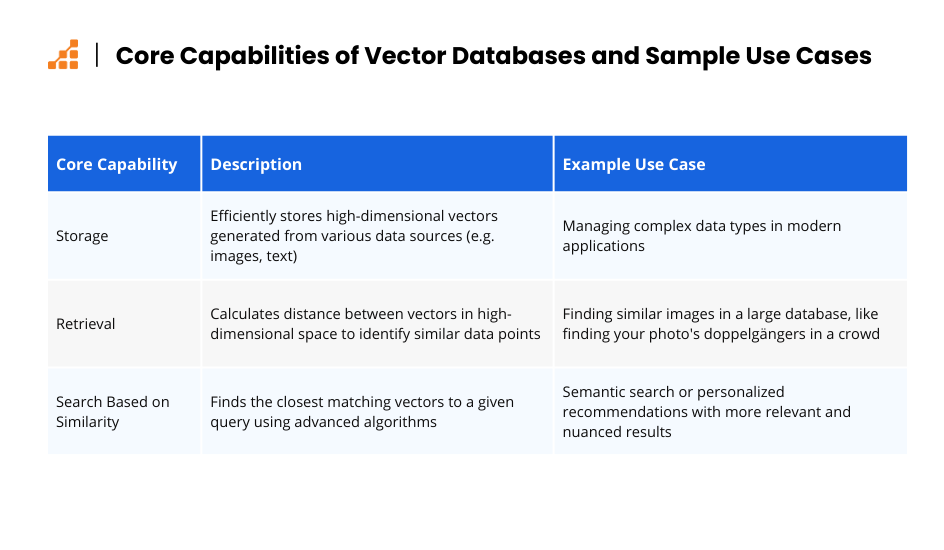
Let’s dive into the core capabilities of vector databases: storage, retrieval, and search based on similarities.
Storage
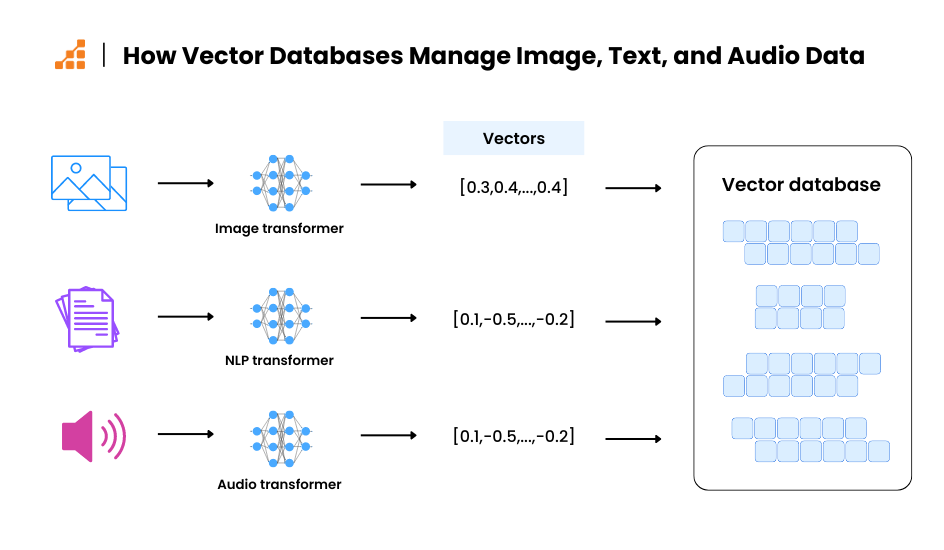
Vector databases are designed to efficiently store high-dimensional vectors generated from various data sources like images, text, and audio. This means they can effectively manage the complex data types that modern applications throw at them.
Retrieval
These databases excel at similarity search. Imagine you have a favorite photo, and you want to find others like it in a huge database. Vector databases can quickly identify similar images by calculating the distance between vectors in high-dimensional space. It’s like finding your photo’s doppelgangers in a crowd!
Search Based on Similarity
Instead of relying on exact matches, vector databases use advanced algorithms to find the closest matching vectors to a given query. This opens up powerful features like semantic search, personalized recommendations, and applications involving large language models. By leveraging these algorithms, vector databases can perform tasks that traditional databases struggle with, providing more relevant and nuanced results.
Sum up: Strengths of Vector Databases
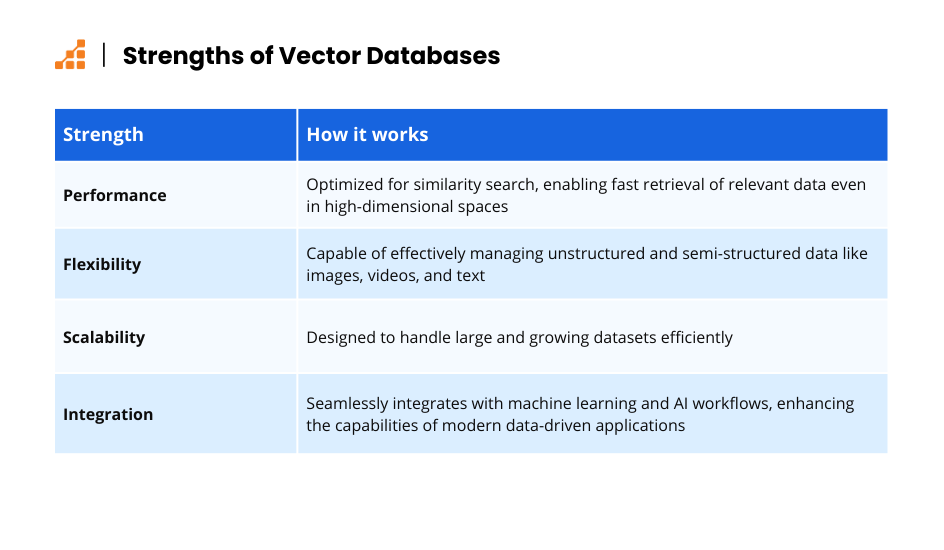
- Performance: Optimized for similarity search, enabling fast retrieval of relevant data even in high-dimensional spaces.
- Flexibility: Capable of effectively managing unstructured and semi-structured data like images, videos, and text.
- Scalability: Designed to handle large and growing datasets efficiently.
- Integration: Seamlessly integrates with machine learning and AI workflows, enhancing the capabilities of modern data-driven applications.
By leveraging these strengths, vector databases empower organizations to unlock the full potential of their complex data, leading to valuable insights and improved decision-making capabilities.
Understanding Vector Databases: Core Concepts
Now that we have an understanding of what vector databases are, let’s look deeper into what makes them so powerful.
The Power of Vectors: Representing Data as Points in Space
At the heart of vector databases lies the concept of vectors. Vectors are mathematical representations of data points, enabling the processing and analysis of complex data types. Data is transformed into numerical vectors through a process called embedding, which converts text, images, and audio into sets of numbers represented as points in a multidimensional space.
For instance, in natural language processing (NLP), words, sentences, or even entire documents can be transformed into vectors using techniques like Word2Vec, GloVe, or BERT. These vectors capture the semantic meaning of the text, allowing for efficient similarity comparisons.
1from gensim.models import Word2Vec23# Sample sentences4sentences = [5 ["this", "is", "a", "sample"],6 ["we", "are", "learning", "vectors"],7 ["vectors", "can", "represent", "words"]8]910# Training the Word2Vec model11model = Word2Vec(sentences, min_count=1)1213# Getting the vector for the word 'vectors'14vector = model.wv['vectors']15print(vector)16
This code snippet shows how to train a Word2Vec model and retrieve the vector representation for the word “vectors”.
High-Dimensional Space and Its Implications for Similarity Search
Vector databases operate in high-dimensional spaces, providing nuanced representations of complex data. Unlike familiar 2D or 3D spaces, high-dimensional spaces allow for richer data representations but introduce challenges like the “curse of dimensionality,” where distances between points become less meaningful and similarity searches become computationally intensive. Vector databases overcome these challenges with advanced indexing and search techniques, enabling efficient similarity searches.
This code snippet shows how to train a Word2Vec model and retrieve the vector representation for the word “vectors”.
High-Dimensional Space and Its Implications for Similarity Search
Vector databases operate in high-dimensional spaces, providing nuanced representations of complex data. Unlike familiar 2D or 3D spaces, high-dimensional spaces allow for richer data representations but introduce challenges like the “curse of dimensionality,” where distances between points become less meaningful and similarity searches become computationally intensive. Vector databases overcome these challenges with advanced indexing and search techniques, enabling efficient similarity searches.
1import numpy as np2import faiss34# Creating random vectors5d = 64 # dimension6nb = 10000 # database size7nq = 100 # number of queries8np.random.seed(1234)9xb = np.random.random((nb, d)).astype('float32')10xb[:, 0] += np.arange(nb) / 1000.11xq = np.random.random((nq, d)).astype('float32')12xq[:, 0] += np.arange(nq) / 1000.1314# Building the index15index = faiss.IndexFlatL2(d) # L2 distance16index.add(xb) # adding the database vectors to the index1718# Searching for the nearest neighbors19k = 5 # number of nearest neighbors20D, I = index.search(xq, k) # search for the k nearest neighbors2122print(I[:5]) # print the indices of the nearest neighbors for the first 5 queries
This snippet demonstrates how to create an index using Faiss and perform a similarity search for the nearest neighbors.
Balancing Accuracy and Speed: Trade-offs in Indexing Approaches
Different indexing techniques offer varying trade-offs between accuracy and speed. For example, Hierarchical Navigable Small World (HNSW) provides high accuracy but may be slower for very large datasets, whereas IVF and PQ offer faster search times with slightly lower accuracy. The choice of indexing method depends on the application’s specific requirements.
Key Functionalities of Vector Databases
Vector databases offer a unique set of functionalities tailored for high-dimensional data and similarity search. Let’s explore each a bit further.
K-Nearest Neighbors (KNN): Retrieving the k most similar data points
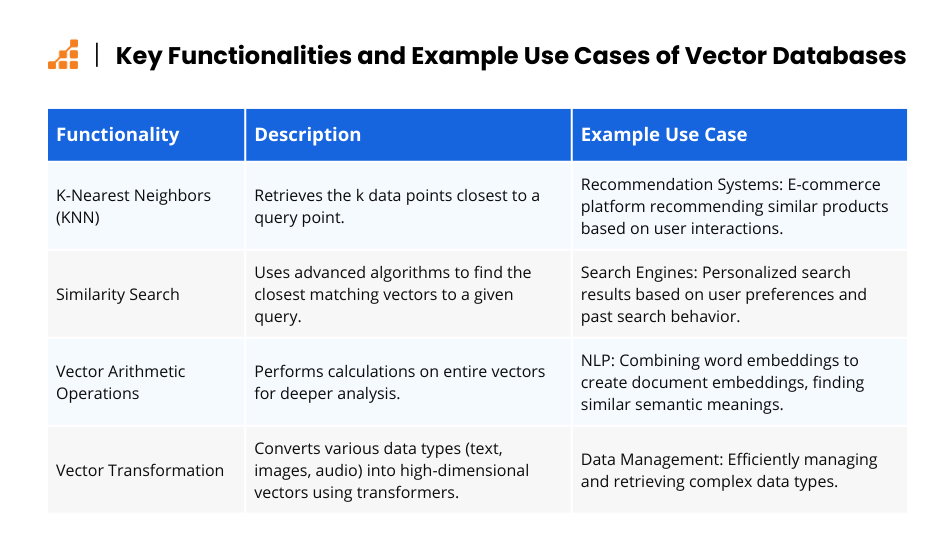
This functionality retrieves the k data points closest to a query point. KNN is commonly used in recommendation systems, where the system recommends items similar to those a user has interacted with in the past.
Consider an e-commerce platform that uses KNN for product recommendations. When a user views a particular product (represented as a vector based on its features), the system retrieves the k most similar items (based on product feature vectors) and suggests them as recommendations.
This code snippet demonstrates a more comprehensive approach to similarity search using Faiss. It incorporates logic to convert an unstructured data point (text in this example) into a vector representation before performing the similarity search.
1from transformers import AutoTokenizer, AutoModel2import faiss345# Define functions for data preprocessing and embedding6def preprocess_text(text):7 """8 Preprocesses text data (e.g., tokenization, cleaning)9 """10 # Replace with your specific preprocessing steps11 return text.lower().strip()121314def get_text_embedding(text):15 """16 Generates a vector embedding from preprocessed text17 """18 tokenizer = AutoTokenizer.from_pretrained("sentence-transformers/all-mpnet-base-v2")19 model = AutoModel.from_pretrained("sentence-transformers/all-mpnet-base-v2")202122 # Preprocess text23 preprocessed_text = preprocess_text(text)242526 # Tokenize the text27 encoded_input = tokenizer(preprocessed_text, return_tensors="pt")282930 # Generate vector embedding using a pre-trained sentence transformer model31 with torch.no_grad():32 output = model(**encoded_input)33 return output.pooler_output.squeeze(0).numpy() # Convert tensor to numpy array343536# Define some sample text data37text_data = [38 "This is a document about computer science",39 "Natural language processing is a fascinating field",40 "Machine learning algorithms are becoming increasingly powerful"41]424344# Create empty list to store vector embeddings45data_embeddings = []464748# Convert text data to embeddings and store them49for text in text_data:50 embedding = get_text_embedding(text)51 data_embeddings.append(embedding)525354# Create a Faiss index (choose an appropriate index type for your data)55index = faiss.IndexFlatL2(len(data_embeddings[0])) # FlatL2 for L2 distance565758# Add the data embeddings to the index59index.add(data_embeddings)606162# Define a query text string63query_text = "Search for documents related to artificial intelligence"646566# Get the query vector embedding67query_embedding = get_text_embedding(query_text)686970# Find the k nearest neighbors (adjust k based on your needs)71k = 2 # Retrieve the 2 closest data points72distances, neighbors = index.search(query_embedding.reshape(1, -1), k)737475# Print the results: document texts and distances of nearest neighbors76print("Nearest Neighbors:")77for i in range(k):78 print(f" - Text: {text_data[neighbors[0][i]]}, Distance: {distances[0][i]}")
Vector Arithmetic Operations: Performing calculations on vectors for deeper analysis
Unlike traditional databases that operate on individual data elements, vector databases enable performing calculations on entire vectors. This allows for operations like vector addition, subtraction, and multiplication, which can be used for tasks like finding cluster centers in high-dimensional data.
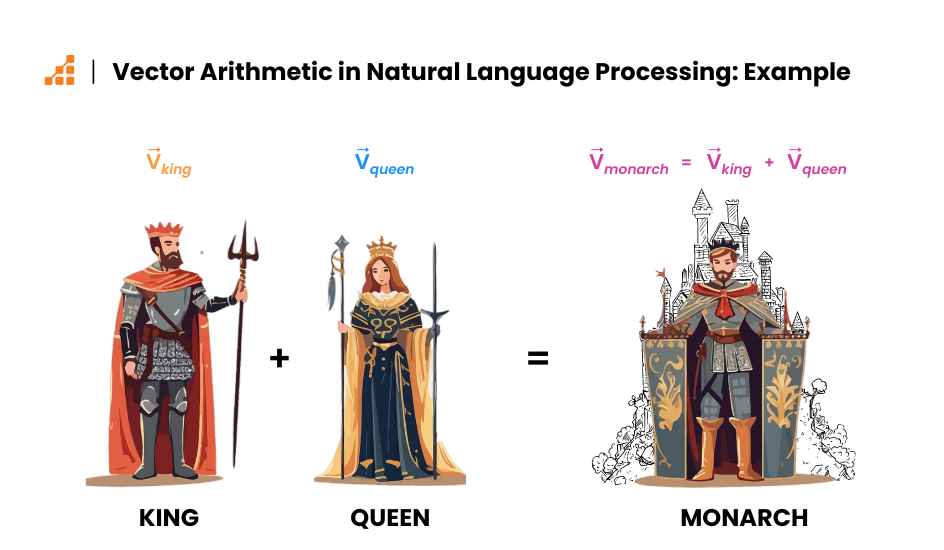
Here’s an example: in natural language processing, vector addition can be used to combine word embeddings to create document embeddings. This allows for finding documents with similar semantic meaning based on the combined vector representations. For instance, the sum of the vector representations for “king” and “queen” might be similar to the vector representation for “monarch.”
These functionalities empower vector databases to excel in various applications that require efficient similarity search and analysis of high-dimensional data. We’ll explore these applications in the next section.
Use Cases of Vector Databases: Real-World Applications
Vector databases are revolutionizing various fields by enabling efficient similarity search and analysis of complex data. Here are some key use cases where vector databases demonstrate their power.
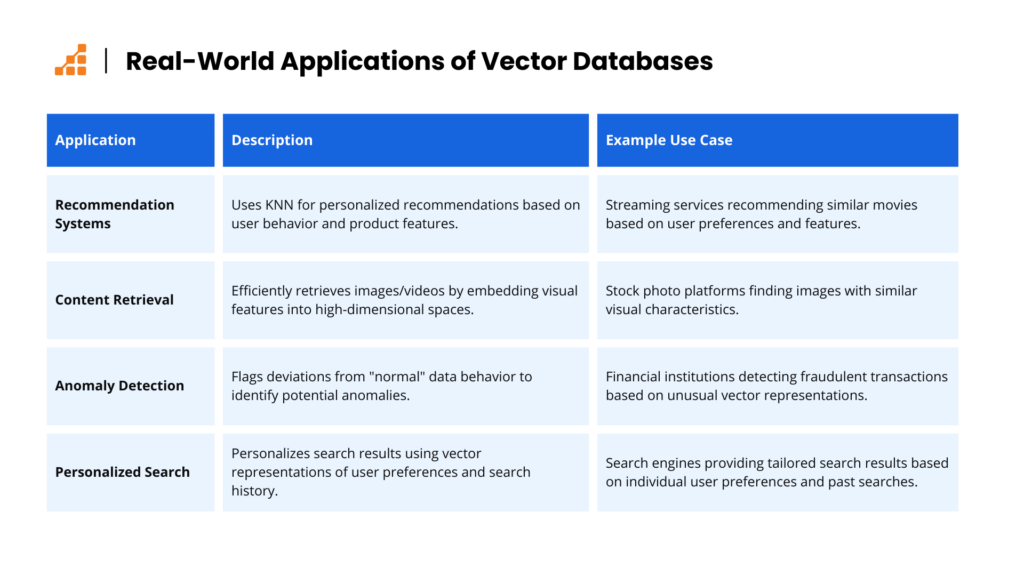
Recommendation Systems
KNN is a popular technique used in recommendation systems. Vector databases excel at finding similar items based on user behavior or product features, leading to more personalized and relevant recommendations.
For instance, a streaming service might use vector databases to recommend movies similar to those a user has watched in the past. User preferences and movie features (actors, genre, director) can be embedded as vectors, allowing the system to find movies with similar vector representations. For an in-depth analysis of how this can work, check out this article on how Netflix uses machine learning.
Content Retrieval
Vector databases are ideal for efficient image and video retrieval. Images and videos can be embedded into high-dimensional spaces based on their visual features (color, texture, shapes). This allows for fast and accurate retrieval of similar content based on user queries.
Imagine searching for stock photos on a platform. Vector databases can efficiently find images with similar visual characteristics to your query image, even if the keywords associated with the images differ. Facebook’s Faiss Library is a great example of this.
Anomaly Detection
Identifying unusual data points is crucial for fraud prevention, security, and system maintenance. Vector databases can establish a baseline for “normal” data behavior. Deviations from this baseline can be flagged as potential anomalies.
For instance, a financial institution might use vector databases to analyze customer transactions. Transactions with significantly different vector representations compared to a user’s typical spending patterns could indicate potential fraudulent activity.
Personalized Search
Search engines can leverage vector databases to personalize search results based on user preferences and past search behavior.
How to Choose the Right Vector Database: Comparing Pinecone, Milvus and Faiss
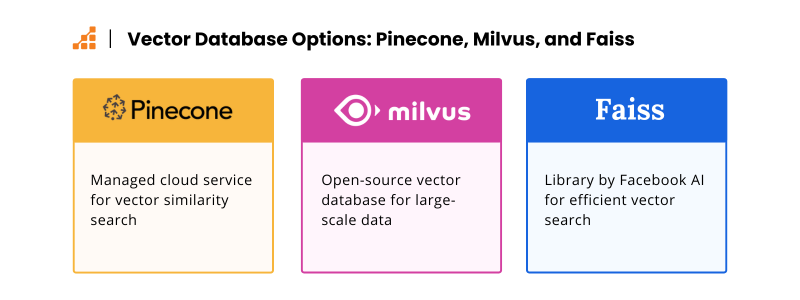
With the growing popularity of vector databases, several options are available. Here’s a brief comparison of three popular choices: Pinecone, Milvus, and Faiss.
Scalability: Handling Growing Data Volumes
Scalability is a critical consideration when evaluating vector databases. As the volume of data grows, the database must efficiently handle the increasing number of vectors without compromising performance. Vector databases are designed to scale horizontally, meaning they can distribute the data and workload across multiple servers or nodes. This approach ensures that as data volumes expand, the system can accommodate the growth by adding more resources.
Modern vector databases like Milvus and Pinecone are built with scalability in mind. They use distributed architectures and sharding techniques to manage large datasets effectively.
Performance: Speed and Efficiency
Performance is key, especially for applications that require real-time or near-real-time responses. High-performance vector databases use optimized indexing techniques and in-memory processing to accelerate query execution.
For example, Faiss, developed by Facebook AI Research, is renowned for its high-speed vector search capabilities, particularly for large-scale datasets.
Integration: Seamless Integration with Existing Infrastructure
A vector database should integrate seamlessly with various data sources, data pipelines, and analytics tools. This ensures that the vector database can work in harmony with the existing ecosystem, facilitating data ingestion, processing, and analysis.
Vector databases often provide APIs and SDKs in multiple programming languages, making it easier for developers to integrate them into their applications. For instance, Milvus offers comprehensive APIs in Python, Java, and Go, allowing developers to easily connect the database to their data pipelines and analytics frameworks. Additionally, many vector databases support integration with popular machine learning libraries like TensorFlow and PyTorch, enabling efficient model deployment and inference.
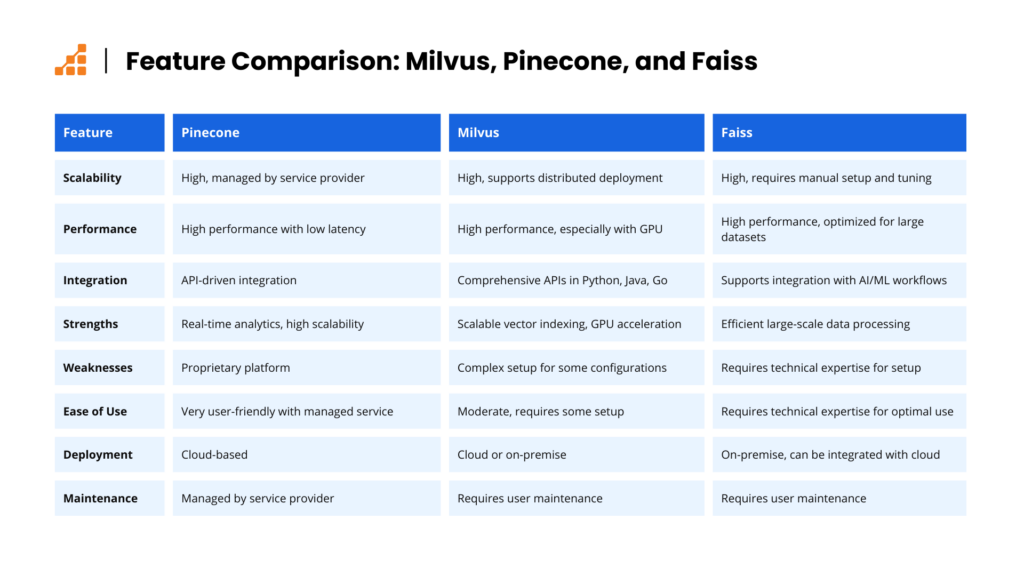
Overall, when choosing a vector database, it is essential to consider its scalability, performance, and integration capabilities. These factors ensure that the database can handle growing data volumes, deliver the required speed and efficiency, and integrate seamlessly with the existing data infrastructure, providing a robust solution for managing and querying high-dimensional data.
The Future of Data Management: Why Vector Databases Will Take Center Stage
As we look ahead, vector databases are poised to transform the landscape of data management, driving innovation and efficiency across various fields.
Impact on Data Management Strategies
Vector databases are revolutionizing data management strategies by enabling faster and more efficient data analysis across various tasks. They address the challenges of handling high-dimensional data, especially in similarity searches, clustering, and real-time analytics.
For instance, consider a recommendation system for an e-commerce platform. Traditional methods might involve complex SQL queries and manual feature engineering to recommend products. With vector databases, each product and user interaction can be represented as a high-dimensional vector. These vectors capture intricate relationships and can be quickly queried to find similar items, making the recommendation process significantly faster and more accurate.
Democratizing Similarity Search for a Wider Range of Applications
Vector databases are making similarity search accessible to a broader range of applications. Even small startups and individual developers can leverage powerful similarity search functionalities.
For example, a startup developing a music recommendation app can use a vector database to match user preferences with a vast library of songs, ensuring personalized recommendations. This capability extends to various domains such as image retrieval, document clustering, and fraud detection, enabling more organizations to harness the power of similarity search.
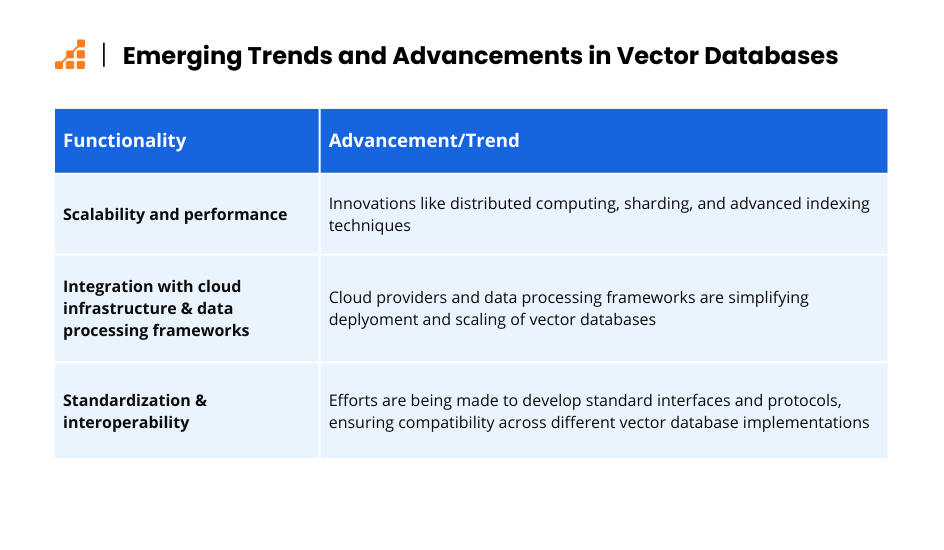
Emerging Trends and Advancements in Vector Databases
As data volumes continue to grow, scalability and performance have become paramount. Vector databases are evolving to handle increasingly larger datasets with enhanced performance. Innovations such as distributed computing, sharding, and advanced indexing techniques are at the forefront of these improvements.
Scalability and Performance Improvements
As data volumes continue to grow, scalability and performance have become paramount. Vector databases are evolving to handle increasingly larger datasets with enhanced performance. Innovations such as distributed computing, sharding, and advanced indexing techniques are at the forefront of these improvements.
For instance, Milvus, an open-source vector database, employs a distributed architecture that allows it to scale horizontally, efficiently managing large-scale datasets across multiple nodes. This architecture ensures high availability and fault tolerance, making it suitable for enterprise-grade applications.
Integration with Cloud Infrastructure and Data Processing Frameworks
The integration of vector databases with cloud infrastructure and data processing frameworks is another emerging trend. Cloud providers like AWS, Google Cloud, and Azure offer managed services that simplify the deployment and scaling of vector databases. Additionally, integration with data processing frameworks such as Apache Spark and TensorFlow facilitates seamless workflows for machine learning and big data analytics.
For example, Amazon Web Services (AWS) offers Amazon Elasticsearch Service, which supports vector search capabilities, allowing users to run similarity searches on their data stored in the cloud. This integration enables organizations to leverage the scalability and reliability of cloud infrastructure while benefiting from the advanced querying capabilities of vector databases.
Standardization and Interoperability Between Different Vector Databases
As the adoption of vector databases grows, so does the need for standardization and interoperability. Efforts are being made to develop standard interfaces and protocols that allow different vector databases to work together seamlessly. This trend ensures that organizations can choose the best tools for their needs without worrying about compatibility issues.
The development of the Vector Similarity Search API, for example, aims to provide a unified interface for performing similarity searches across various vector database implementations. Such standardization efforts will facilitate the adoption of vector databases by reducing the complexity and overhead associated with integrating multiple systems.
Final Thoughts
Vector databases are essential for managing high-dimensional data and enabling complex analyses, particularly in AI and machine learning applications. They enhance AI/ML capabilities by efficiently handling and querying high-dimensional vectors, essential for tasks like image recognition, natural language processing, and personalized recommendations.
To unlock their potential, it’s vital to understand their core functionalities, such as efficient similarity search, scalability, and seamless integration with existing tools and workflows. When selecting a vector database, consider factors like scalability, performance, and integration with your current systems to ensure it meets your specific needs.
Explore and experiment with vector databases through hands-on practice to fully grasp their capabilities, and stay informed about the latest advancements and innovations in the field. By embracing these technologies, you can join the vector database revolution, positioning yourself at the forefront of data management and AI advancements, and unlocking new opportunities for innovation and efficiency.
References
- Johnson, J., Douze, M., & Jégou, H. (2019). Billion-scale similarity search with GPUs. Facebook AI Research.
- Erik Bernhardsson. (2018). Annoy: Approximate Nearest Neighbors in C++/Python optimized for memory usage and loading/saving to disk. Spotify.
- Zilliz. (2021). Milvus: An open-source vector database for AI applications. Zilliz.
- Guo, R., et al. (2020). Efficient and Effective Similarity Search and Recommendation using Locality-Sensitive Hashing. ACM.
APPENDIX
Querying a Vector Database: An Example
To demonstrate how to query a vector database, we will use Milvus, a popular open-source vector database designed for efficient similarity search. Milvus allows you to store, index, and query vectors. Below is a step-by-step example of how to set up Milvus, insert some sample vectors, and perform a query to find the nearest neighbors of a given vector.
Step 1: Set Up Milvus
First, you need to install Milvus and its dependencies. You can run Milvus using Docker for simplicity.
1docker pull milvusdb/milvus:latest234docker run -d --name milvus-standalone -p 19530:19530 milvusdb/milvus:latest
Step 2: Install Milvus Python SDK
1pip install pymilvus
Step 3: Connect to Milvus
Now, you can connect to the Milvus server using the Python SDK.
1from pymilvus import connections2connections.connect("default", host="localhost", port="19530")
Step 4: Create a Collection
Create a collection in Milvus to store your vectors. Define the schema with the necessary fields, including a primary key and a vector field.
1from pymilvus import Collection, FieldSchema, CollectionSchema, DataType2fields = [3 FieldSchema(name="id", dtype=DataType.INT64, is_primary=True, auto_id=True),4 FieldSchema(name="vector", dtype=DataType.FLOAT_VECTOR, dim=128)5]6schema = CollectionSchema(fields, "example collection")789collection = Collection("example_collection", schema)
Step 5: Insert Vectors
Insert some sample vectors into the collection.
1import numpy as np234num_vectors = 10005dim = 1286vectors = np.random.random((num_vectors, dim)).astype(np.float32)789entities = {"vector": vectors}10collection.insert([entities])
Step 6: Create an Index
Create an index on the vector field to enable efficient similarity search.
1index_params = {2 "index_type": "IVF_FLAT",3 "metric_type": "L2",4 "params": {"nlist": 128}5}678collection.create_index("vector", index_params)
Step 7: Perform a Query
Query the collection to find the nearest neighbors of a given vector.
1# Load the collection into memory2collection.load()345# Generate a random query vector6query_vector = np.random.random((1, dim)).astype(np.float32)789# Perform the query10search_params = {"metric_type": "L2", "params": {"nprobe": 10}}11results = collection.search(query_vector, "vector", param=search_params, limit=5)121314# Display results15for result in results[0]:16 print(f"ID: {result.id}, Distance: {result.distance}")
This example demonstrates the basic steps to set up a Milvus vector database, insert vectors, create an index, and perform a similarity search query. Milvus provides powerful capabilities for handling high-dimensional data, making it an excellent choice for applications requiring efficient vector search.